사용 방법
while (true)
{
    Console.WriteLine("안녕!");
    Thread.Sleep(1000);
}- 안녕 을 출력후 Thread.Sleep 을 만나면 (숫자)만큼 지연한다.
- 1000은 1초
- 500은 0.5 초
주의
using System;
using System.Threading;
- 이거 작성해야 쓰레드 적용됨
비주얼 노벨처럼 구현해보자
using System;
using System.Threading;

namespace _250909_HoChan
{
    internal class Program
    {
        static void Main(string[] args)
        {
            Console.ForegroundColor = ConsoleColor.Red;
            Console.WriteLine("소녀");
            Console.ResetColor();
            string a = "혹시 전학생 맞으시죠?";

            for (int i = 0; i < a.Length; i++)
            {
                Console.Write(a[i]);
                Thread.Sleep(100);
            }
            Console.WriteLine();
            Console.WriteLine();

            Console.ForegroundColor = ConsoleColor.Green;
            Console.WriteLine("전학생");
            Console.ResetColor();
            string b = "네 맞아요!";

            for (int j = 0; j < b.Length; j++)
            {
                Console.Write(b[j]);
                Thread.Sleep(100);
            }
            Console.WriteLine();
        }
    }
}- char 가 비주얼 노벨처럼 하나하나씩 천천히 출력된다
▼출력
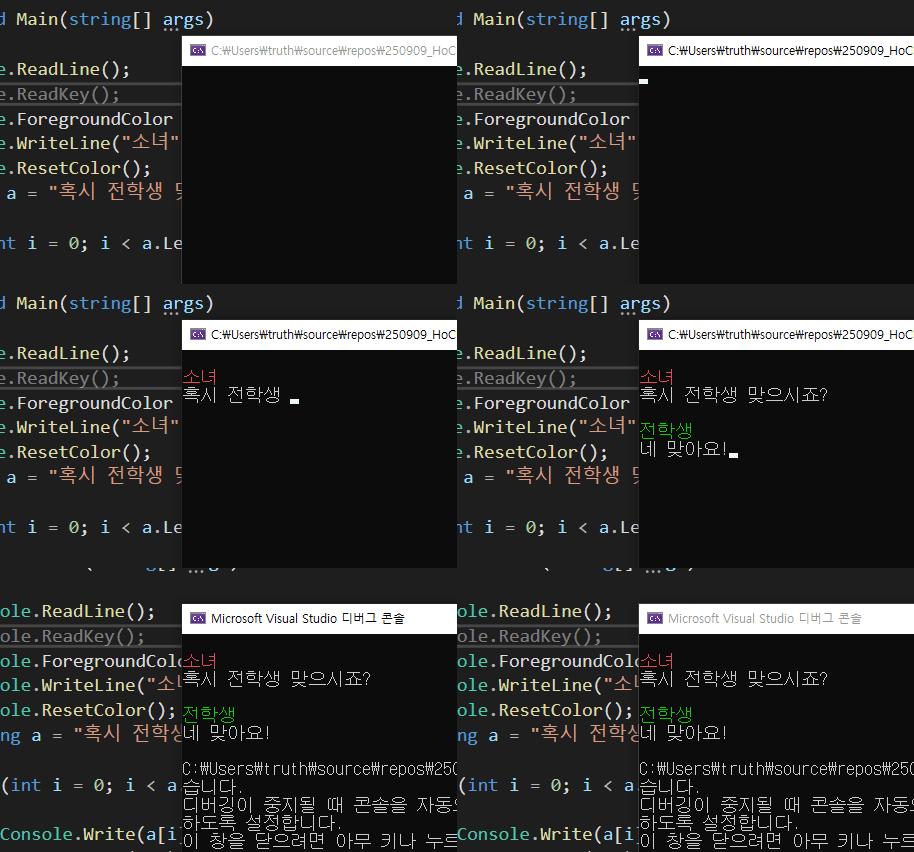
Thread.Sleep 을 사용하면 좀더 생동감 있게 연출할수 있다.
'📖TIL > 💡DevTips' 카테고리의 다른 글
| 무료 에셋 사이트 정리 (0) | 2025.10.25 |
|---|---|
| ASCII Art (0) | 2025.10.02 |
| 좋은 변수명 짓는 원칙 (0) | 2025.10.01 |
| VS에서 디버깅 중 콘솔 창 크기 임의 설정 (0) | 2025.09.30 |