오브젝트 풀
- 오브젝트 풀 개념을 익힌다
- 배열과 리스트로 SetActive(true) , (false)
- 심화 : 제네릭 버전으로 만든다
- 모든걸 다 액션 기반으로 등록할 수 있는 시스템 구축
퍼포먼스 올리기
- Update 를 덜 돌게 하기
- Instantiate / Destroy 만 덜 하게 해도 성능 개선에 도움이 된다
내부단편화 : 할당된 메모리 공간 안에서 사용되지 않고 남는 공간이 생기는 현상
외부단편화 : 총 여유 메모리는 충분하지만 연속된 큰 공간이 부족해서 새 프로세스를 올릴수 없는 현상
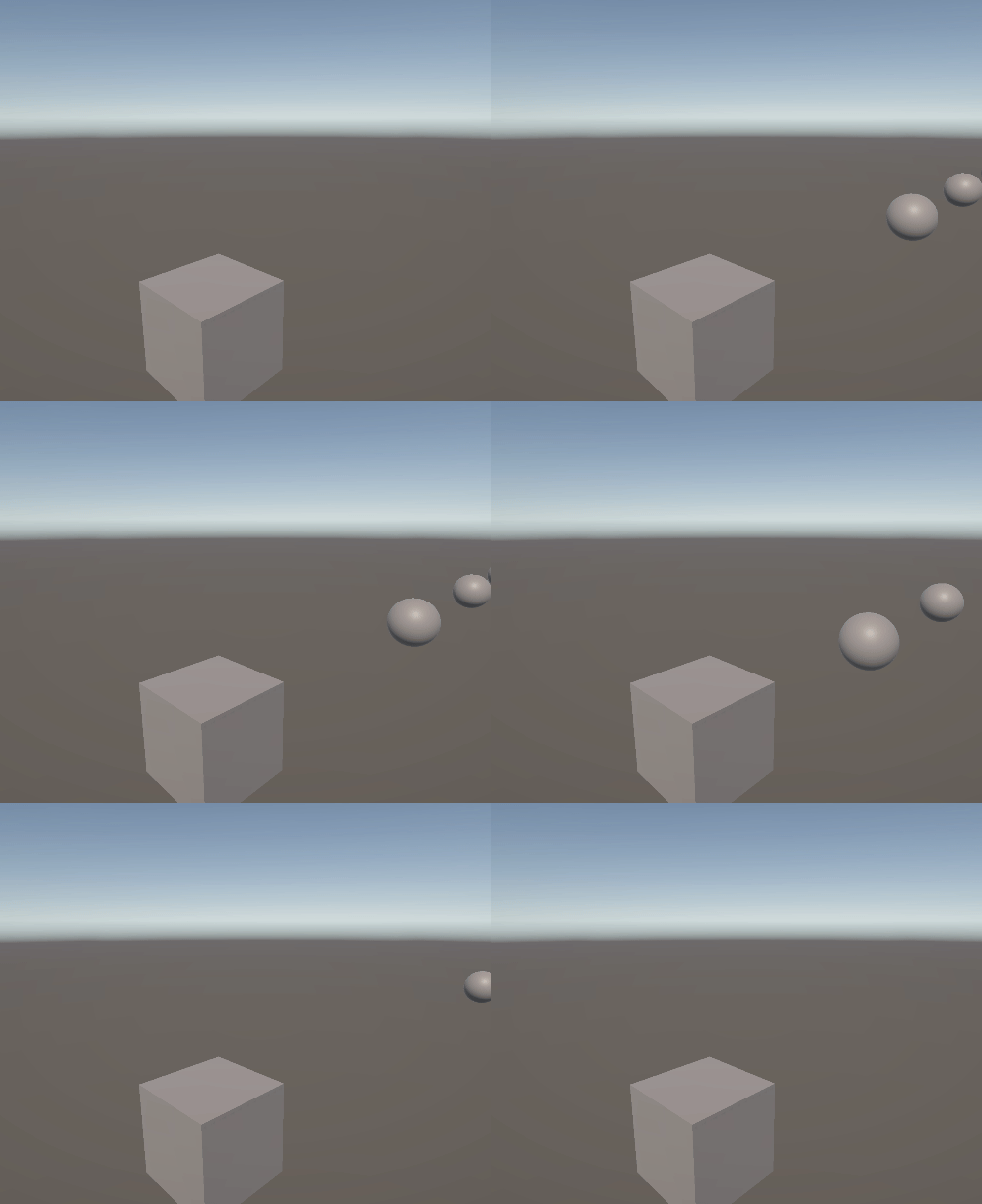
▼ 오브젝트 풀링 구현 코드
using NUnit.Framework;
using System.Collections.Generic;
using UnityEngine;
using UnityEngine.InputSystem; // 좌클릭 등으로 발사하게 하려고함

public class FireLogic : MonoBehaviour
{
    [Header("발사 관련 설정")]
    [SerializeField] GameObject bulletPrefab;
    [SerializeField] int initalPoolSize = 10;
    [SerializeField] float bulletSpeed = 20f;

    private List<GameObject> bulletPool;
    private InputAction fireAction;

    void OnShoot(InputAction.CallbackContext ctx) // 인풋시스템을 사용하기 위한 메서드
    {
        FireBullet();
    }

    private void Awake() // 오브젝트 풀 초기 세팅, 풀에 수많은 총알을 시작과 동시에 담는다
    {
        bulletPool = new List<GameObject>();
        for(int i = 0; i < initalPoolSize; i++)
        {
            CreateNewBullet();
        }
        fireAction = InputSystem.actions["Attack"];
    }


    private void OnEnable()
    {
        fireAction.performed += OnShoot;
    }

    private void OnDisable() // 구독이 있으면 항상 구독 해제도 만들면 좋다
    {
        fireAction.performed -= OnShoot;
    }

    void Update()
    {

    }

    GameObject CreateNewBullet() // bullet 새로 만들고, 이걸 Pool에 담는다
    {
        GameObject newBullet = Instantiate(bulletPrefab); // 그냥 만든거
        newBullet.SetActive(false); // 만들자마자 비활성화
        bulletPool.Add(newBullet); // 관리중인 리스트에 담을 것
        return newBullet;
    }
    void FireBullet()
    {
        GameObject bullet = GetInActiveBullet();
        if (bullet == null)
        {
            bullet = CreateNewBullet();
        }
        bullet.transform.position = transform.position + transform.forward * 2; // 총알의 위치 = 발사자 위치에서 살짝 앞에
        bullet.transform.rotation = transform.rotation; // 발사자의 로테이션
        bullet.SetActive(true); // 풀에서 사용 중인 것 활성화

        bullet.GetComponent<Rigidbody>().linearVelocity = transform.forward * bulletSpeed;
    }

    GameObject GetInActiveBullet()
    {
        foreach (GameObject bullet in bulletPool)
        {
            if (!bullet.activeInHierarchy) // activeSelf
            {
                return bullet;
            }
        }

        return null;
    }
}
using UnityEngine;
public class BulletController : MonoBehaviour
{
[SerializeField] public float lifeTime = 3f;
public Rigidbody rb;
private void Awake()
{
rb = GetComponent<Rigidbody>();
}
private void OnEnable()
{
Invoke(nameof(DisableBullet), lifeTime);
}
private void OnDisable()
{
rb.linearVelocity = Vector3.zero; // 이전 속도가 남아있을 수도 있어서 zero 로 초기화
rb.angularVelocity = Vector3.zero;
CancelInvoke(); // 모든 인보크 없애버린다
}
private void OnBecameInvisible() // 어느 카메라에서도 이걸 볼 수 없게 되었을 때
{
DisableBullet();
}
private void OnCollisionEnter(Collision collision) // 충돌했다면
{
// 총알 Destroy 가 아닌 Disable
DisableBullet();
}
void DisableBullet()
{
gameObject.SetActive(false);
}
}
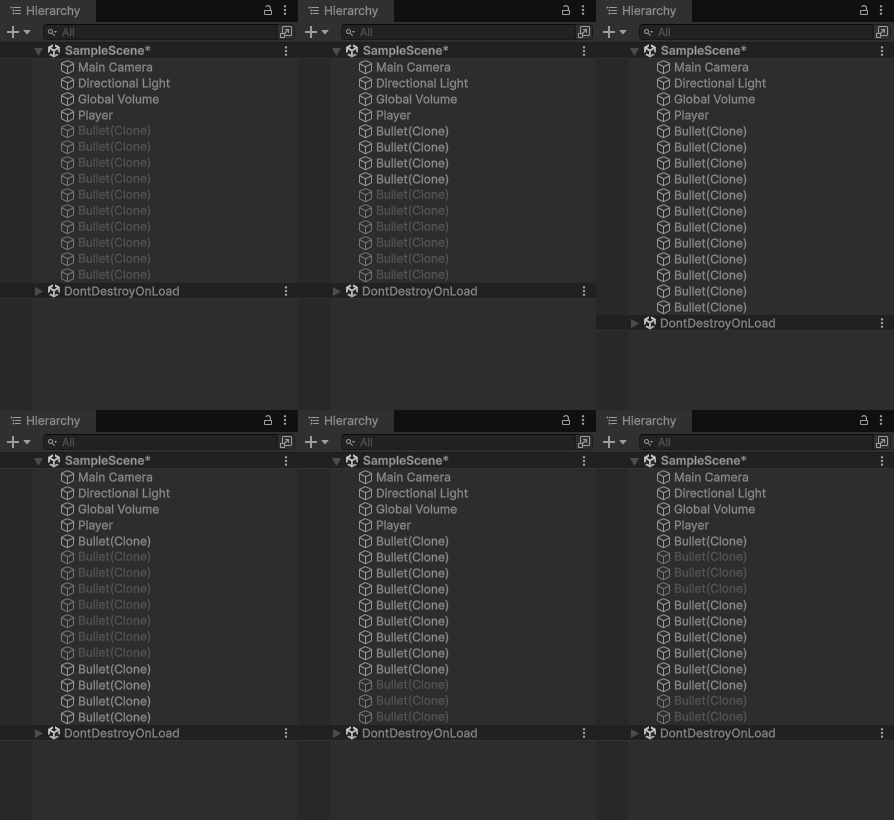
using System.Collections.Generic;
using Unity.VisualScripting;
using UnityEngine;
using UnityEngine.InputSystem;
using UnityEngine.Pool;

public class FireLogic : MonoBehaviour
{
    [Header("발사 관련 설정")]
    [SerializeField] GameObject bulletPrefab;
    [SerializeField] int initialPoolSize = 10;
    [SerializeField] float bulletSpeed = 20f;

    private Queue<GameObject> bulletPool = new Queue<GameObject>();
    private InputAction fireAction;


    //▼총알 새로 만들고, 이걸 풀에 담는다
    GameObject CreateNewBullet()
    {
        GameObject newBullet = Instantiate(bulletPrefab); //그냥 만든거
        newBullet.SetActive(false); //만들자마자 꺼버리기
        bulletPool.Enqueue(newBullet);
        return newBullet;
    }

    void OnShoot(InputAction.CallbackContext ctx)////////////////
    {
        FireBullet();
    }
    private void Awake()
    {
        for (int i = 0; i < initialPoolSize; i++)
        {
            CreateNewBullet();
        }
        fireAction = InputSystem.actions["Attack"]; //////////////////
    }

    private void OnEnable()
    {
        fireAction.performed += OnShoot;//////////////
    }

    private void OnDisable()
    {
        fireAction.performed -= OnShoot;////////////////
    }

    void FireBullet()
    {
        GameObject bullet = GetInactiveBullet();
        if (bullet == null)
        {
            //return; 게임 성향에 맞게끔 위 아래 선택
            bullet = CreateNewBullet();
        }

        bullet.transform.position = transform.position + transform.forward * 2; //발사자 포지션 살짝 앞에
        bullet.transform.rotation = transform.rotation; //발사자의 로테이션
        bullet.SetActive(true); //풀에서 사용중인건 켜주기

        bullet.GetComponent<BulletCtrl>().SetOwner(this);

        Rigidbody rb = bullet.GetComponent<Rigidbody>();
        rb.linearVelocity = transform.forward * bulletSpeed;
    }
    GameObject GetInactiveBullet()
    {
        if (bulletPool.Count > 0) //사용할 수 있는 총알이 있다는 뜻
        {
            return bulletPool.Dequeue();
        }
        return null;
    }
    public void ReturnBullet(GameObject bullet)
    {
        bullet.SetActive(false);
        bulletPool.Enqueue(bullet);
    }
}
using Unity.VisualScripting;
using UnityEngine;
public class BulletCtrl : MonoBehaviour
{
public float lifeTime = 3f;
Rigidbody rb;
//추상적인 개념을 하나 들고있게 할 것. 풀을 가질 수 있는 객체
FireLogic fireLogic; //파이어로직이 무언가를 상속받고, 상속을 준 부모 객체에는 풀이 있어야 한다
public void SetOwner(FireLogic fire)
{
fireLogic = fire;
}
private void Awake()
{
rb = GetComponent<Rigidbody>();
}
private void OnEnable()
{
Invoke(nameof(DisableBullet), lifeTime);
}
private void OnDisable()
{
rb.linearVelocity = Vector3.zero; //만약 이전 속도가 남아있는 버그가 있다면 여기 체크
rb.angularVelocity = Vector3.zero;
CancelInvoke(); //모든 인보크 없애버림
}
private void OnBecameInvisible()
{
DisableBullet();
}
private void OnCollisionEnter(Collision collision)
{
DisableBullet();
}
void DisableBullet()
{
fireLogic.ReturnBullet(this.gameObject);
}
}
▼ 오브젝트 풀 심화
using UnityEngine;
using System.Collections.Generic;

public class ObjPool<T> where T : MonoBehaviour
{
    Queue<T> pool; // 여기에 몬스터 , 적 , 파티클 등등
    private T prefab;

    public ObjPool(T prefab, int initSize)
    {
        this.prefab = prefab;
        pool = new Queue<T>();

        for(int i = 0; i < initSize; i++)
        {
            T Instance = Object.Instantiate(prefab);
            Instance.gameObject.SetActive(false);
            pool.Enqueue(Instance);
        }
    }

    public T GetObject()
    {
        if(pool.Count > 0)
        {
            T obj = pool.Dequeue();
            obj.gameObject.SetActive(true);
            return obj;
        }

        // 만약 풀을 늘릴 수 있는 계열의 게임이었다면?

        T newObj = Object.Instantiate(prefab);
        return newObj;
    }

    public void ReturnObject(T obj)
    {
        pool.Enqueue(obj);
        obj.gameObject.SetActive(false);
    }
}
▼ 유니티에 내장된 오브젝트 풀 기능 사용하기
using Unity.VisualScripting;
using UnityEngine;
using UnityEngine.Pool;

public class RealFinalPool : MonoBehaviour
{
    #region 람다식
    // 람다식 : (입력값) => {함수의 동작}
    //int GetNumber()
    //{
    //    return 35;
    //}
    // () => 35;
    #endregion

    ObjectPool<GameObject> myPool; // 오브젝트 내장 풀 이미 만들었음
    public GameObject toInstantiate; // 풀이 사용할 프리팹

    private void Start()
    {
        myPool = new ObjectPool<GameObject>
            (
                CreateNewObject, // 생성할 때
                ActivateObject, // GET 을 수행할 것
                DeactivateObject, // SET 을 수행할 것
                DestroyObject // 파괴할 때
            );
    }

    // 객체를 생성하는 메서드
    GameObject CreateNewObject()
    {
        return Instantiate(toInstantiate); // 프리팹을 인스턴스화 시키고 , 방금 만들어진거 반환
    }

    void ActivateObject(GameObject obj) // 객체를 활성화하는 메서드 및 풀에서 꺼낼 때 수행해야 할 메서드 정
    {
        obj.SetActive(true); // 우치를 발사자 위치로 바꾼다던지..
    }

    void DeactivateObject(GameObject obj)
    {
        obj.SetActive(false); // 이외에도 리니어벨로시티 0 으로 만드는 등등
    }

    void DestroyObject(GameObject obj)
    {
        Destroy(obj.gameObject); // 이외에도 스코어를 올리거나 , 혹은 씬 전환 등
    }

    // 플레이어는 아래처럼 플레이어 로직만 들고 있게 하고 싶다
    private void Update()
    {
        if(Input.GetKeyUp(KeyCode.Escape))
        {
            var ibj = myPool.Get();
            ibj.GetComponent<Rigidbody>().AddForce(transform.position);
        }
    }
}
▼ 람다식을 사용해서 코드 간결하게 하기
using Unity.VisualScripting;
using UnityEngine;
using UnityEngine.Pool;

public class RealFinalPool : MonoBehaviour
{
    ObjectPool<GameObject> myPool; // 오브젝트 내장 풀 이미 만들었음
    public GameObject toInstantiate; // 풀이 사용할 프리팹

    private void Start()
    {
        myPool = new ObjectPool<GameObject>
            (
            // 명명된 인수
                createFunc: () => Instantiate(toInstantiate), // CreateFunc ( toInstantiate 캡쳐 )
                actionOnGet: obj => obj.SetActive(true),  // OnGet
                actionOnRelease: obj => obj.SetActive(false), // OnRelease
                actionOnDestroy: obj => Destroy(obj.gameObject) // 파괴할 때
            );
    }

    // 플레이어는 아래처럼 플레이어 로직만 들고 있게 하고 싶다
    private void Update()
    {
        if(Input.GetKeyUp(KeyCode.Escape))
        {
            var ibj = myPool.Get();
            ibj.GetComponent<Rigidbody>().AddForce(transform.position);

            myPool.Release(this.gameObject); // 반환시키고자 하는 총알
        }
    }
}
'📖TIL' 카테고리의 다른 글
| 251112 Particle (0) | 2025.11.12 |
|---|---|
| 251112 AudioSource (0) | 2025.11.12 |
| 251111 (0) | 2025.11.11 |
| 251110 (0) | 2025.11.10 |
| 251109 (0) | 2025.11.09 |