CSV 와 JSON
PlayerPrefs : 진짜 간단하게 수치를 기억시키는 방법 ( 소규모 데이터 )
저장은 잘 되는 방식인데, 파일시스템이 아니고 레지스트리나 OS별 설정파일에 저장된다
암호화되지 않고, 고로 핵이나 치트에 취약하다.
인게임 볼륨 , 간단한 설정 등은 플레이어 프랩스로 로컬로 기억시킬 수 있다.
JSON : 가볍고 직관적인 파일 저장 방식
ScriptableObj : 에셋으로 데이터를 저장
Addressable : 리소스를 주소로 불러와서 관리함
PlayerPrefs.SetInt("이런키값으로", 원하는값을);
PlayerPrefs.GetInt("이런키값으로", 1);
using UnityEngine;
using UnityEngine.InputSystem;
public class SaveTest : MonoBehaviour
{
public float playerHealth = 100;
private void Start()
{
playerHealth = PlayerPrefs.GetFloat("Health");
Debug.Log(playerHealth);
}
private void Update()
{
if(Keyboard.current.pKey.IsPressed())
{
playerHealth = 50;
PlayerPrefs.SetFloat("Health", playerHealth);
}
}
}using UnityEngine;
using UnityEngine.InputSystem;
public class SaveTest : MonoBehaviour
{
[SerializeField] Transform player;
void SavePlayerData()
{
PlayerPrefs.SetFloat("PlayerX", player.position.x);
PlayerPrefs.SetFloat("PlayerY", player.position.y);
PlayerPrefs.SetFloat("PlayerZ", player.position.z);
}
void LoadPlayerData()
{
float x = PlayerPrefs.GetFloat("PlayerX", player.position.x);
float y = PlayerPrefs.GetFloat("PlayerY", player.position.y);
float z = PlayerPrefs.GetFloat("PlayerZ", player.position.z);
player.position = new Vector3(x, y, z);
}
private void Start()
{
LoadPlayerData();
}
private void Update()
{
if (Keyboard.current.pKey.IsPressed())
{
SavePlayerData();
}
if (Keyboard.current.oKey.IsPressed())
{
LoadPlayerData();
}
}
}
JSON
( JavaScript Object Notation )
유니티에서 네트워크로 주고 받을 때에도 자주 쓰인다
문자열로 객체를 저장하는 방식

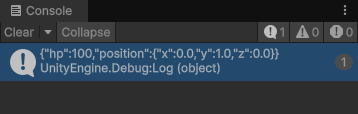
이런 식으로 저장된다.
▼데이터를 JSON 파일로 변환
using UnityEngine;

[System.Serializable] // 직렬화 가능하다는 속성을 부여, JSON 변환을 위해서 직렬화가 가능해야 한다.
public class PlayerData
{
    public int hp;
    public Vector3 position;
}

public class SaveTest2 : MonoBehaviour
{
    public GameObject playerToSave;

    private void Start()
    {
        // 유의미한 데이터 생성 및 기입
        PlayerData pd = new PlayerData();
        pd.hp = 100;
        pd.position = playerToSave.transform.position;

        // JSON으로 변환
        string json;
        json = JsonUtility.ToJson(pd); // 끝!

        Debug.Log(json);
    }
}
▼JSON 을 다시 객체로 변환
// JSON을 다시 객체로 변환
PlayerData loadedData = JsonUtility.FromJson<PlayerData>(json);
// 문자열 하나를 열어보고, 내가 지정한 클래스 형태로 꺼내온다

Debug.Log(loadedData.hp);
Debug.Log(loadedData.position);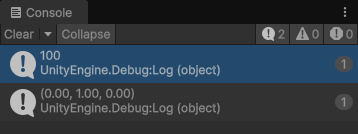
JSON의 강점
▼파일로 변환시키기
using UnityEngine;
using System.IO; // Input , Output ( 입출력을 가능케 해주는 도구들의 집합 )

[System.Serializable] // 직렬화 가능하다는 속성을 부여, JSON 변환을 위해서 직렬화가 가능해야 한다.
public class PlayerData
{
    public int hp;
    public Vector3 position;
}

public class SaveTest2 : MonoBehaviour
{
    public GameObject playerToSave;
    private string filePath; // 파일 경로 지정

    private void Start()
    {
        // 저장될 파일 경로 설정. persistentDataPath 는 데이터가 수시로 들락날락하는 , 그리고 종료되어도 유지되는 공간
        filePath = Path.Combine(Application.persistentDataPath, "playerData.json");
        Debug.Log("파일경로 : " + filePath);
    }

    void SaveData()
    {
        PlayerData pd = new PlayerData();
        pd.hp = 100;
        pd.position = playerToSave.transform.position;

        string json = JsonUtility.ToJson(pd, true); // 옆에 true 는 보기 좋게 포맷한다는 뜻
        File.WriteAllText(filePath, json); // 파일로 저장, 원하는 경로에, 문자열을
        Debug.Log("저장 완료!");
    }

    void LoadData()
    {
        // 원하는 파일이 존재하는지 경로 확인해보고 참거짓 판단
        if (File.Exists(filePath))
        {
            string json = File.ReadAllText(filePath); // 파일에서 문자열을 읽어온다. 아직 그냥 통짜 "문자열" 그 자체
            PlayerData player = JsonUtility.FromJson<PlayerData>(json); // 이젠 Json클래스 도움 받아서 문자열을 클래스 형식에 맞게 파싱

            playerToSave.transform.position = player.position;
            Debug.Log("로드 완료!");
        }
        else
        {
            Debug.LogWarning("파일 없음!");
        }
    }
}
JSON의 단점 : Dictionary 를 한번에 저장하지 못한다.
심화 : 뉴턴제이슨
'📖TIL' 카테고리의 다른 글
| 251113 NavMesh (0) | 2025.11.13 |
|---|---|
| 251113 스크립터블 오브젝트 (0) | 2025.11.13 |
| 251113 (0) | 2025.11.13 |
| 내가 이해한 오브젝트 풀링 개념 (0) | 2025.11.12 |
| 251112 Particle (0) | 2025.11.12 |