▼유니티 공식 문서 디자인패턴
https://unity.com/kr/resources/design-patterns-solid-ebook
팩토리 패턴, 오브젝트 풀링, 싱글톤, 명령 패턴, 상태, 관찰자, MVP, 모델뷰, 전략 패턴, 플레이웨이트, 더티 플래그 등
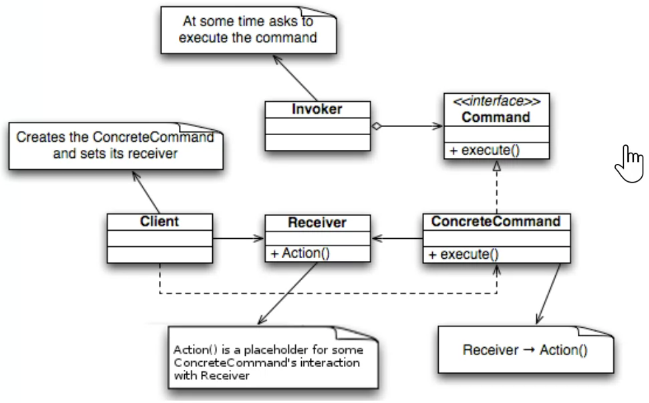
커맨드 패턴 : 요청을 객체로 캡슐화하여 실행하는 쪽과 실제 동작을 분리하는 디자인 패턴
- 키설정 변경
- 입력 기록 저장
- 실행 취소
- 리플레이
- 무르기 기능
- 요청을 객체로 캡슐화
- 실행 주체와 요청자료를 분리한다
- 요청을 저장하고 실행 / 취소 / 재실행이 가능하도록 설계 ( 커스텀 가능 )
생각하야 할 것은 딱 3개
- Invoker : 직역하면 발생자 ( 키보드 입력 , 게임 패드 입력 , 버튼 등 )
- Command : 그 입력에 의해서 발동되는 행동 ( 공격 , 이동 , 점프 등 )
- Receiver : 그걸 보고 행동을 하는 진짜 캐릭터 코딩
using UnityEngine;
using UnityEngine.InputSystem;

public class PlayerController : MonoBehaviour
{
    Rigidbody rb;
    Animator animator;
    Vector3 moveDir;

    void Start()
    {
        rb = GetComponent<Rigidbody>();
        animator = GetComponent<Animator>();

        // 글로벌 인풋
        InputSystem.actions["Move"].performed += OnMove;
        InputSystem.actions["Move"].canceled += OnMove;
        InputSystem.actions["Attack"].performed += OnAttack;
        InputSystem.actions["Jump"].performed += OnJump;
    }

    private void OnDestroy()
    {
        InputSystem.actions["Move"].performed -= OnMove;
        InputSystem.actions["Move"].canceled -= OnMove;
        InputSystem.actions["Attack"].performed -= OnAttack;
        InputSystem.actions["Jump"].performed -= OnJump;
    }

    void Update()
    {
        if(moveDir != Vector3.zero)
        {
            transform.rotation = Quaternion.LookRotation(moveDir);
            transform.Translate(Vector3.forward * Time.deltaTime * 4f);
        }
    }

    private void OnMove(InputAction.CallbackContext ctx)
    {
        Vector2 input = ctx.ReadValue<Vector2>();
        moveDir = new Vector3(input.x, 0, input.y);

        animator.SetFloat("MoveFloat", input.magnitude);
    }

    private void OnAttack(InputAction.CallbackContext ctx)
    {
        if (!ctx.performed) return;
        animator.SetTrigger("AttackTrigger");
    }

    void OnJump(InputAction.CallbackContext ctx)
    {
        if (!ctx.performed) return;

        rb.AddForce(Vector3.up * 5f, ForceMode.Impulse);
    }
}
using UnityEngine;
public interface ICommand // 모든 명령은 이걸 적용받아서 사용
{
void Execute();
}
public class MoveCommand: ICommand
{
PlayerController player; // 명령을 수행할 대상
Vector3 direction; // 명령 수행에 필요한 정보
public MoveCommand(PlayerController player, Vector3 dir)
{
this.player = player;
this.direction = dir;
}
public void Execute()
{
player.Move(direction);
}
}
public class JumpCommand: ICommand
{
PlayerController player;
public JumpCommand(PlayerController plr)
{
this.player = plr;
}
public void Execute()
{
player.Jump();
}
}
// 액션들만 모아둔, 일종의 명령클래스 모임집을 생성.
public class AttackCommand: ICommand
{
PlayerController player;
public AttackCommand(PlayerController plr)
{
this.player = plr;
}
public void Execute()
{
player.Attack();
}
}using UnityEngine;
using UnityEngine.InputSystem;
public class InputHandler : MonoBehaviour
{
[SerializeField] PlayerController player; // 제어를 할 캐릭터
private void Awake()
{
InputSystem.actions["Move"].performed += OnMove;
InputSystem.actions["Move"].canceled += OnMove;
InputSystem.actions["Attack"].performed += OnAttack;
InputSystem.actions["Jump"].performed += OnJump;
}
private void OnDestroy()
{
InputSystem.actions["Move"].performed -= OnMove;
InputSystem.actions["Move"].canceled -= OnMove;
InputSystem.actions["Attack"].performed -= OnAttack;
InputSystem.actions["Jump"].performed -= OnJump;
}
private void OnMove(InputAction.CallbackContext ctx)
{
Vector2 input = ctx.ReadValue<Vector2>();
Vector3 dir = new Vector3(input.x, 0, input.y);
ICommand moveCmd = new MoveCommand(player, dir); // 다형성을 이용해서 만들어냈음
moveCmd.Execute();
}
private void OnAttack(InputAction.CallbackContext ctx)
{
if (!ctx.performed) return;
ICommand attackCmd = new AttackCommand(player);
attackCmd.Execute();
}
private void OnJump(InputAction.CallbackContext ctx)
{
if (!ctx.performed) return;
ICommand jumpCmd = new JumpCommand(player);
jumpCmd.Execute();
}
}
▼커맨드리코더
주요 용도 (유니티 개발 환경)
- 입력 매핑(Input Mapping) :
유니티의 새로운 Input System처럼 특정 키에 기능을 바인딩할 때 사용.
'A' 키를 누르면 JumpCommand가 실행되도록 설정, 나중에 설정을 통해 'Space' 키로 쉽게 바꿀 수 있다. - 리플레이 시스템(Replay System) : 사용자가 내린 커맨드들을 시간 순서대로 저장했다가 ,
다시 순차적으로 실행하면 게임 플레이를 그대로 재현할 수 있다. - 전략 시뮬레이션/RPG의 행동 예약 :
캐릭터에게 "이동 후 공격, 그 다음 아이템 사용"과 같이 명령을 예약(Queue)해두고 순차적으로 처리할 때 유용하다.
using UnityEngine;
using System.Collections.Generic;

public class CmdRecorder
{
    List<ICommand> commands = new List<ICommand>();
    bool isRecording = false;

    public void StartRecording() // 리코딩 시작
    {
        commands.Clear(); // 커맨드 남아있다면 날리고
        isRecording = true; // 리코딩 상태 참으로 변경
    }

    public void StopRecording()
    {
        isRecording = false;
    }

    public void Record(ICommand command) // 기록. 만약 리코드 모드가 켜져있다면 커맨드 발생할 때마다 리스트에 담을것
    {
        if(isRecording == true)
        {
            commands.Add(command);
        }
    }

    public void Play()
    {
        foreach(var cmd in commands)
        {
            cmd.Execute();
        }
    }
}
// TimeStamp, 레코딩 시간 간격을 저장
public void Play() // 그냥 플레이하면 한 프레임에 다 해버리니, 코루틴으로 리팩토링
{
// 프레임에 걸쳐서 재생하는 법. 코루틴 등
foreach(var cmd in commands)
{
cmd.Execute();
}
}using UnityEngine;
using System.Collections.Generic;
using System.Collections;
public class CmdRecorder : MonoBehaviour
{
List<ICommand> commands = new List<ICommand>();
bool isRecording = false;
public void StartRecording() // 리코딩 시작
{
commands.Clear(); // 커맨드 남아있다면 날리고
isRecording = true; // 리코딩 상태 참으로 변경
}
public void StopRecording()
{
isRecording = false;
}
public void Record(ICommand command) // 기록. 만약 리코드 모드가 켜져있다면 커맨드 발생할 때마다 리스트에 담을것
{
if(isRecording == true)
{
commands.Add(command);
}
}
public void Play()
{
StartCoroutine(PlayRoutine());
}
IEnumerator PlayRoutine()
{
foreach(var cmd in commands)
{
yield return cmd.ExecuteReplay();
}
}
}using UnityEngine;
using System.Collections;
public interface ICommand // 모든 명령은 이걸 적용받아서 사용
{
void Execute();
IEnumerator ExecuteReplay(); // 나중에 리플레이 재생용 Execute 버전을 제작
}
public class MoveCommand: ICommand
{
PlayerController player; // 명령을 수행할 대상
Vector3 direction; // 명령 수행에 필요한 정보
public MoveCommand(PlayerController player, Vector3 dir)
{
this.player = player;
this.direction = dir;
}
public void Execute()
{
player.Move(direction);
}
public IEnumerator ExecuteReplay()
{
player.Move(direction);
yield return null;
}
}
public class JumpCommand: ICommand
{
PlayerController player;
public JumpCommand(PlayerController plr)
{
this.player = plr;
}
public void Execute()
{
player.Jump();
}
public IEnumerator ExecuteReplay()
{
player.Jump();
yield return null;
}
}
// 액션들만 모아둔, 일종의 명령클래스 모임집을 생성.
public class AttackCommand: ICommand
{
PlayerController player;
public AttackCommand(PlayerController plr)
{
this.player = plr;
}
public void Execute()
{
player.Attack();
}
public IEnumerator ExecuteReplay()
{
player.Attack();
yield return null;
}
}
public class WaitCommand: ICommand
{
float waitTime;
public WaitCommand(float time)
{
waitTime = time;
}
public void Execute() { }
public IEnumerator ExecuteReplay() // WaitCommand 는 리코딩 수행할 때, 여기서 대기를 걸어버림
{
yield return new WaitForSeconds(waitTime);
}
}using UnityEngine;
using UnityEngine.InputSystem;
public class InputHandler : MonoBehaviour
{
[SerializeField] PlayerController player; // 다형성을 활용해서, 추상클래스 또는 인터페이스를 들고 있게함
[SerializeField] CmdRecorder recorder;
float lastCommandTime; // 마지막 명령 들어왔던 시간
void RecordAndExecute(ICommand command)
{
float now = Time.time; // 현재 시간 측정
float gap = now - lastCommandTime;
if(gap > 0.01f)
{
recorder.Record(new WaitCommand(gap));
}
recorder.Record(command);
lastCommandTime = now;
command.Execute();
}
private void Awake()
{
InputSystem.actions["Move"].performed += OnMove;
InputSystem.actions["Move"].canceled += OnMove;
InputSystem.actions["Attack"].performed += OnAttack;
InputSystem.actions["Jump"].performed += OnJump;
}
private void OnDestroy()
{
InputSystem.actions["Move"].performed -= OnMove;
InputSystem.actions["Move"].canceled -= OnMove;
InputSystem.actions["Attack"].performed -= OnAttack;
InputSystem.actions["Jump"].performed -= OnJump;
}
private void OnMove(InputAction.CallbackContext ctx)
{
Vector2 input = ctx.ReadValue<Vector2>();
Vector3 dir = new Vector3(input.x, 0, input.y);
RecordAndExecute(new MoveCommand(player, dir));
}
private void OnAttack(InputAction.CallbackContext ctx)
{
if (!ctx.performed) return;
RecordAndExecute(new AttackCommand(player));
}
private void OnJump(InputAction.CallbackContext ctx)
{
if (!ctx.performed) return;
RecordAndExecute(new JumpCommand(player));
}
public void StartRecording() // 리코딩을 하라는 걸 발생
{
recorder.StartRecording(); // 얘가 수행함
}
public void StopRecording()
{
recorder.StopRecording();
}
public void PlayRecorded()
{
recorder.Play();
}
}
'📖TIL' 카테고리의 다른 글
| 260113 Addressable (0) | 2026.01.13 |
|---|---|
| 260112 Addressable (0) | 2026.01.12 |
| 원페이지 기획서 예시 (0) | 2026.01.09 |
| 260109 커맨드 패턴 (0) | 2026.01.09 |
| 260109 네트워크 데이터 드리븐 (0) | 2026.01.09 |